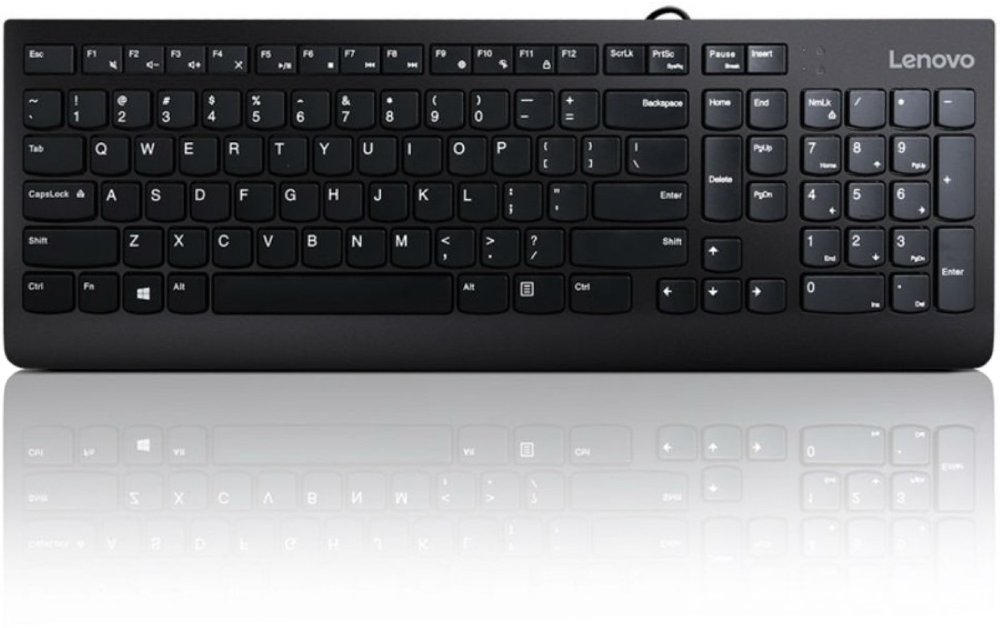
USB keyboards connect to a computer through a USB cable or a compatible USB wireless receiver, giving you a dedicated typing surface for work, school, gaming, and everyday tasks. A wired USB keyboard carries keystrokes and draws power through its cable, so there’s no battery to recharge before finishing a report or sending an email. A wireless keyboard with a USB receiver communicates with that receiver over a radio connection, keeping the typing area free of a keyboard cable while still using a port on your computer. Bluetooth-only keyboards connect differently and don’t require a USB receiver; a USB charging port alone doesn’t mean a keyboard supports wired typing. Those distinctions matter when choosing a keyboard for a desktop tower, a laptop connected to a monitor, or a shared family workstation. Connector shape matters, too. USB-A is the familiar rectangular connector found on many computers and docking stations, while USB-C has a smaller, oval shape that plugs in either way. Match the keyboard’s connector or receiver to an open port, or check whether a compatible adapter supports data as well as power. Basic typing often works as soon as a compatible keyboard is connected, though advanced shortcuts, programmable keys, and lighting controls may need supported software. Operating system compatibility deserves a closer look if you rely on particular modifier keys, media controls, or accessibility features. A keyboard can type successfully yet have shortcut labels that don’t match your computer’s commands. For a home office, a dependable connection keeps the setup straightforward: sit down, open your document, and start typing. For a student, a separate keyboard can also make a laptop-and-monitor arrangement more practical by allowing the screen and typing surface to sit at different heights. The best fit starts with the connection your device supports and the tasks you repeat most often, rather than the longest list of extras.
Keyboard size and key layout shape how comfortably everything fits on your desk. A full-size USB keyboard typically includes a dedicated number pad, function keys, and a separate navigation cluster, making it useful for spreadsheets, bookkeeping, and frequent number entry. Many standard U.S. layouts have 104 keys, although extra controls and different designs can change that count. A tenkeyless keyboard removes the number pad while generally keeping the function row and navigation keys, leaving more room to position your mouse close to your typing hand. Smaller 75% and 60% layouts save additional space, but some commands move to secondary key combinations. That trade-off can suit a narrow writing desk or a keyboard carried between workspaces, while feeling less convenient for someone who regularly uses dedicated arrow or function keys. Check the actual width and depth rather than relying only on a layout name, especially if the keyboard needs to fit a pullout tray alongside a mouse. Key feel is another everyday difference worth considering. Membrane keyboards commonly offer a softer press, scissor-switch designs often provide a short, low-profile stroke, and mechanical keyboards use individual switches that can feel smooth, tactile, or distinctly clicky. Mechanical doesn’t automatically mean loud, and quietness varies with the switch, keycaps, case, and typing technique. In a shared office or study space, a quieter design can help keep each keystroke from becoming a distraction. For long writing sessions, consistent feedback and a comfortable reach may matter more than decorative features. Adjustable feet change the typing angle, but a steeper angle isn’t necessarily more comfortable; a setup that lets your wrists stay relatively straight is a better goal. Split or curved layouts may suit some users, although they can take practice. Backlit keys can make legends easier to see in a dim workspace, while large, high-contrast lettering improves readability without requiring lighting. Gamers may also value anti-ghosting and key rollover, which help a keyboard register supported combinations of simultaneous presses.
Materials, construction, and care all influence how a USB keyboard holds up to daily use. Plastic housings are common and can keep a keyboard easy to move, while metal top plates or aluminum cases can add rigidity and weight. Neither material alone guarantees durability: a stable base, nonslip feet, firmly seated keys, and good cable strain relief all contribute to a keyboard that stays steady through repeated use. Keycaps are often made from ABS or PBT plastic. ABS can develop a polished surface with use, while PBT generally resists that shine better, though texture and wear vary by design. Molded-in legends, often described as double-shot legends, resist wearing away because the lettering is part of the keycap rather than simply printed on top. For a keyboard that travels in a bag, a detachable cable can make packing easier, provided the replacement cable and connections support the keyboard’s requirements. On a permanent desk, enough cable length to reach the computer without pulling tight helps keep the setup tidy and reduces stress on the connector. Everyday care is usually simple: unplug the keyboard, remove loose debris according to its care instructions, and wipe approved surfaces with a lightly dampened cloth. Keep liquid away from openings, and avoid spraying cleaner directly onto the keys. Spill-resistant doesn’t mean waterproof or washable, so follow the stated cleaning directions rather than assuming a keyboard can go under running water. Shared workstations may benefit from easy-to-clean surfaces, but disinfectant compatibility needs to be confirmed before applying cleaning chemicals. Thoughtful extras should match the way the keyboard will be used. Dedicated volume controls can simplify media playback, while programmable shortcuts may help with repetitive tasks when the required software is supported. For video meetings or online lessons, USB headsets can complement a dedicated keyboard; account for both connections when planning your computer’s ports. A USB keyboard can also make a useful gift for a student, remote worker, or enthusiastic gamer when you know their device compatibility, preferred layout, and space limitations. A familiar key arrangement, readable lettering, and a typing feel that suits the recipient make the gift personal in a practical way.
Read More